What we learned
If I could redo my setup
Before installing panels:
- Upgrade main panel to 200 amps
- Upgrade roof with certified roofer
- Upgrade all appliances to electric
- Remove gas meter (PG$E removes for free)
- Use our electric bill with the highest kWh, and then multiply it by 12 to size our system
- Oversize my solar panel system as much as I can for the future 5+ decades
Planning the installation:
- Add a 2nd inverter to avoid clipping and to have a backup inverter
- Install batteries outside in the shade instead of inside the garage (if your climate allows it)
Know your solar goals
Before installing solar panels, we didn't know much about solar and just had two goals:
- Be able to power our house during a power outage.
- Reduce our electric bills.
But after installing solar panels and learning more, our desires and goals changed:
- It's thrilling to see the huge surplus of energy generated in spring and summer!
- Instead of reducing our electric bills in half, ours were reduced by 90%--that's so close to being off-grid!
- Let's convert all gas appliances to electric to use all of this free excess energy!
And then some truths became apparent:
- Winter sun is so low and cloudy and generates about one-third of summer sun.
- We need a 2nd battery to run the clothes dryer (or multiple appliances) without drawing from the grid.
- Note: This is no longer a problem with a single Powerwall3 battery.
- We need four more solar panels (costs only $600) to generate more power to avoid drawing from the grid during winter.
- No installer will do $600 worth of work since they focus on installing $18,000+ solar panel systems.
So, now we're stuck with what we have. We still love our solar panels, but it would've been nice to have a slightly bigger system from the start.
The moral: think carefully what you want to achieve because it's near impossible to find an installer willing to travel for a tiny amount of profit--changes need to be expensive enough to make it worth their time.
Other things to consider:
- Panels last many decades--latest studies state solar panels last at least 40 or 50 years.
- Panels degrade 0.5% per year, so by year 40, your system will generate 20% less than their first year.
- Electricity rates keep increasing, so it's best to oversize your solar panel system as much as you can.
- Batteries seem expensive but are totaaly worth it--and are necessary for evenings, cloudy days, and outtages.
- 10-year financing is probably the most affordable method (we paid $260/mo) since there's no penalty on extra payments.
Install as much as you can
That is, install as many solar panels as you can afford.
Solar generation fluctuates throughout the year, so summer months generate about 2.5x as much energy as winter months.

This fluctuation creates:
- a surplus of energy during summer months --> that is either stored in batteries or sold to the grid.
- a deficit of energy during winter months --> that is drawn from the grid.
The solution is to size your solar array on the single month that uses the most kWh and then multiply that number by 12 to calculate your "annual" usage.
That will result in even more of a surplus during summer, which is good because:
- It'll cost only 2-3% more for the 4-6 added panels.
- You'll be fully energy independent all year.
- There's too small of a profit for any installer to add only 6 panels to a system, so they won't do it.
- Panels degrade 0.5% per year and last 50+ years, so you're future-proofing yourself.
For example, in our case:

If you have an EV made in 2024 or newer, your EV has bidirectional charging built-in. That means your home solar system needs only 1 battery because you can use your EV's huge battery to be your home's 2nd (and 3rd and 4th) solar battery.
Why more panels
Note: This section assumes you want to avoid using the grid and want to reduce the ever-growing fees utility companies keep adding and increasing.
Cloudy / rainy / winter days
On days that generate very little power, you'll wish you had more panels to charge your batteries more.
Very difficult to add more panels later
- It's easier to install more panels during the original install.
- Adding panels later requires new permits.
- Installers don't want to take small jobs, so you'll need to add other items to make it worth their time.
More kW from panels = less draw from the Grid
- Even when generating some kW from the sun, it's possible to need more kW from running many appliances at the same time
- Those additional kW come from the Grid--unless you have enough panels.
Panels generate about 90% of your panel kW rating
- For example, at noon during summer, the most our 8.5 kW panels ever generated (briefly) was 7.8 kW.
- For example, during winter, if your usage reaches 9 kW, then you'll want at least 10 kW of panels.
Why 2+ batteries are needed
Note: This section assumes you want to avoid using the grid and avoid 1-battery system inconveniences.
I've never heard of anyone wishing they had fewer batteries.
We started with one Powerwall because we thought Tesla just wanted to up-sell two batteries; but Tesla is right about needing a 2nd Powerwall--and we're so much happier after we added a 2nd Powerwall.
You need at least two batteries because:
Excess electricity is taxable income
Money or credits earned from giving your excess electricity above $400/year is taxable income.
Your grid pays a fraction of what they charge you
- Most summer days generate a surplus that can fill three or four batteries each day.
- And that surplus will be used during the darker winter months.
- Whether that surplus is paid in cash or credit, it's paid at a rate lower than what your utility company charges
- And utility companies have been fighting to pay even less.
- Therefore, the more energy you store, the less you take from the grid or give to the grid.
Using more than one major electrical appliance at the same time needs more power than one battery can supply
- One battery supplies about 5 - 7 kW of power.
- Two batteries (or a Powerwall3) supply 11.4 kW of power.
- Graph of kW usage based on different appliances running simultaneously
One battery can't support a 20 amp, 240 volt outlet used for EV charging
But two batteries (or a Powerwall3) can.
EV batteries are 5 to 7 times bigger than a Powerwall battery.
- One battery can charge only 40 - 45% of an EV.
- Two batteries can charge only 80 - 90% of an EV.
- Three batteries can fully charge an EV -- with a lot still available.
In an outage, one battery lasts half a day, while two batteries last a few days.
From a fully charged state, during an overcast power outage:
- One battery lasts 14 - 19 hours.
- Two batteries last 3 - 4 days.
- Graph of Powerwall SoC
A single battery restricts power supply when SoC is below 30%.
- This is to protect the battery and to reduce the chances of it discharging below 5%, when it shuts off to protect itself from 0%.
- One battery throttles its power supply almost daily during fall and winter when there is little sun to charge it.
- Two batteries almost never fall below 15% SoC, the equivalent of 30% divided by 2 batteries.
One battery can receive only 5.8 kW from the sun, so sunny day kW above 5.8 will go to the grid.
- Solar companies install a minimum of 7.2 kW panels.
- Most solar installs are 8 - 12 kW, which generate 7 - 11 kW in summer.
- Power from the sun exceeding 5.8 kW goes to the grid instead of your single battery.
- Two batteries (or Powerwall3) raise your receiving limit to 11.6 kW.
You can use more of your battery if you rarely have power outages.
- With one battery, 20% is set for reserve to protect the battery.
- With two batteries, only 10% is needed for the same reserve amount.
- This is helpful when charging an EV overnight since it lowers your draw from the grid.
Note: If you often have power outages, you should keep your reserve above 25%.
| Real-life example: Aakash Mehta, 2024 |
|---|
| Thank goodness owning two Powerwalls has built-in redundancy for backup! I recently experienced Powerwall #2 failing to charge or deliver power. My 1st Powerwall was ON and working, and even though it wasn't communicating with the Tesla Gateway, it was still working fine and continued to charge and discharge, which saved me from using the grid mostly. Only you can monitor to see if your Powerwall is functioning properly. If your Powerwall doesn't behave properly, immediately call 877-961-7652 Option #2 for 24x7 support from knowledgeable engineers who are really good in helping you reset the system and read the telemetry available from the Gateway. Tip: they are located in Las Vegas and calling after 6pm PT generally results in getting engineers on the new shift who are more patient and have the empathy to look and talk to you much better than those in the morning shift. |
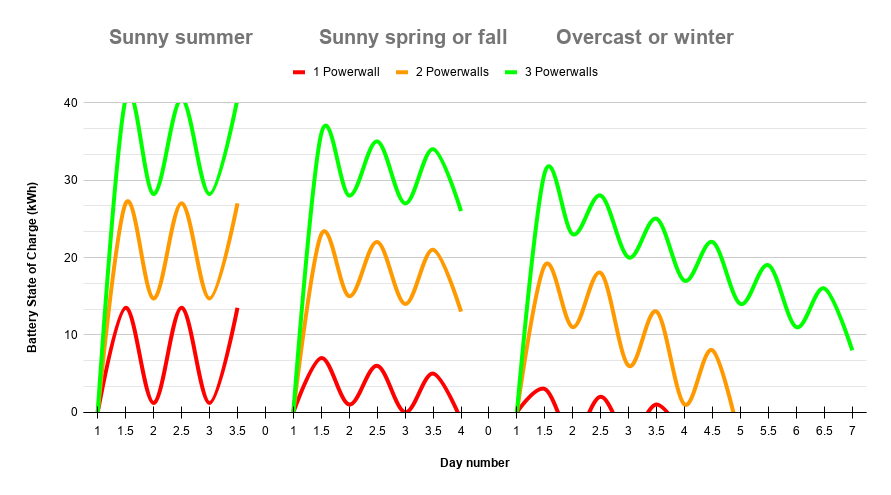
SoC of 1 vs 2 Powerwalls
The State of Charge (SoC) fluctuates throughout the day based on season and weather.
Note: Tesla recommends setting 20% as the lowest SoC (to protect the Powerwall), so 20% is essentially 0%.
Having only one Powerwall, we had the following SoC values:
| Highest SoC | Highest SoC time | Lowest SoC | Lowest SoC time | |
|---|---|---|---|---|
| Sunny summer days | 100% | 10 - 11 am | 30 - 60% | Sunrise |
| Sunny spring/fall days | 50 - 90% | 1 - 3 pm | 20 - 30% | Sunrise |
| Sunny winter days | 20 - 50% | 3 - 5 pm | Setting on app | 9 - 11 pm |
| Overcast / rainy days | 20 - 40% | 4 - 6 pm | Setting on app | 9 - 11 pm |
The following graph shows the how the SoC fluctuates throughout the day in different conditions:
- SoC reaches its peak of 100% charged near midday.
- SoC reaches its bottom before the sun rises.
- SoC's bottom stays the same when it's always sunny.
- SoC's bottom gradually lowers in spring/fall and more in winter.
- 1 battery won't last 1 full day of overcast and will require 8 - 10 hours of grid energy at night.
- 2 batteries can last 3 - 4 days of overcast, while 3 batteries can last 6+ days.
2nd battery avoids grid
- During summer, one battery stays charged on sunny days but needs a second battery on non-sunny days.
- Winter days will absolutely draw from the grid without a 2nd battery and a sufficient number of panels.
- The Powerwall3's 11 kW output removes the need for a 2nd Powerwall2 during spring/summer/fall but not winter.
- 2024 EVs and newer have bi-directional charging and can be used as a 2nd battery.
The below graph shows data from our Tesla mobile app:
- X-axis denotes weeks.
- Y-axis denotes the energy sources.
| Graphs of solar vs battery vs grid | Remarks |
|---|---|
  | 2022 - Mar: PW issue that a 2nd PW would've lessened. - Aug: a cheap, used 3rd-party Gateway breaker broke. 2023 - Jan: two weeks we weren't home. - Jul: we installed a second Powerwall2. - Sep: started charging our EV at home, not office. - Nov: we installed a Heat Pump. 2024 - Aug: we re-roofed and moved 6 NW panels to SE. - Oct: a heat wave caused our Powerwalls to stop supplying power occasionally until they cooled down. |
Where to place batteries
Batteries are mostly weather-proof nowadays, so it's up to you whether you prefer indoors or outdoors, but either way keep in mind:
If inside your garage:
- Make sure you have enough ventilation to let the heat out.
- An insulated garage door massively regulates the temperature during hot summers and cold winters.
- When our garage hit 90 oF, our 92% full battery stopped supplying energy to our home and instead drew from the grid for 30 minutes to let the batteries cool down. (then we got a new garage door to solve the issue)
If outside:
- Make sure they're in the shade or put a lattice of greenery a few inches in front of them to keep them cool.
- Batteries are generally installed half an inch above the ground, but you might want them to be 1 foot above the ground if you have pets or if water often pools in that area.
Charge EV slowly
Although charging an EV at high kW speeds degrade the batteries only 1-2% over many years, it's better to charge your EV at as few kW (amperage) as possible for the following benefits:
- While using other appliances, it reduces your overall load and lowers the chance you'll draw from the grid.
- Your Powerwall2 won't heat up as much and won't use a fan to cool down as much, and thus lasts longer.
If your EV doesn't support adjustable amperage, you can get a wall charger (and maybe a rebate).
Unless urgent, don't charge your EV until your Powerwall2 battery is at least 80% charged.
The routine I follow:
| Time | Routine description |
|---|---|
| 8pm | After dinner and shower, I start charging our EV at 5 amps (1 kW) until our Powerwall2 SoC is ~50% (~10:00 PM), depending on how cloudy tomorrow will be. |
| Noon | After our single Powerwall2 is charged 100%, I continue charging our EV at 5 amps (1 kW) or higher when needed. |
Note: After adding a second Powerwall2, we can charge our EV throughout the night and finish by 6am at 5 amps (1 kW).
Tips for 1-battery systems
Always try to keep your battery SoC above 30%.
| SoC | Supplies | Powerwall2 behavior |
|---|---|---|
| Above 30% | 5.7 kW | Supplies its maximum output |
| 21 - 30% | 2 - 3 kW | Limits supply to protect itself from fully discharging, even in Self-Powered mode |
| 11 - 20% | 1 - 2 kW | Further limits supply to prevent fully discharging |
| Below 11% | 0 kW | 100% of solar goes to the Powerwall2 while your Home is powered 100% by the Grid |
Note: Unless urgent, don't charge extra items overnight, especially if the next morning will be cloudy.
Use Self-Powered mode
Note: If you live in an outage-prone area, then this tip won't apply to you since you should use the default Tesla settings that learn your usage patterns and optimize keeping your battery charged as possible for outages.
To reduce your use of the Grid, go to your Tesla app Settings and select Self-Powered. This will use your Powerwall2 at all times except:
- If your kW power usage exceeds the power generation from your panels + Powerwall2 max (about 5 kW).
- If your Powerwall2 falls below your minimum setting (Tesla recommends 20%).
- Very brief (1 - 3 seconds) "transition periods" of 0.1 - 0.2 kW when energy usage spikes from a big appliance.
Storm Watch needs a 2nd battery
Note: If you live in an outage-prone area, then this tip may not apply to you since you may want to keep your battery fully charged as often as possible.
Storm Watch uses the Grid to fully charge your battery; but if your battery is usually fully charged by the sun by the afternoon, then you don't need to use the Grid to charge it.
If you need to use Storm Watch, it's highly recommended you get a 2nd or 3rd battery.
How many appliances at a time?
It depends on your battery. Most batteries can output only 5.7 kW. To avoid drawing from the Grid, keep in mind:
| How much | kW | Remarks |
|---|---|---|
| A) Your battery can supply | 0.1 - 5.7 | Can be lower if your battery's SoC is below 30% |
| B) Your panels are generating | 0.0 - 4.0 | Depends on your sunlight, which is lower on overcast and winter days |
| ========= | ||
| The sum of (A) plus (B) | 0.1 - 9.7 |
Plan ahead which electrical appliances you'll use, and schedule their use to avoid drawing from the grid:
| Electric appliance | kW usage | Average | Remarks |
|---|---|---|---|
| Oven | 5 - 9 | 7.0 | |
| Clothes dryer | 5 - 6 | 5.5 | * |
| Dishwasher | 3 - 7 | 5.0 | * |
| Shower | 4.5 | 4.5 | * |
| Clothes washer | 2 - 6 | 4.0 | * |
| Stove | 1 - 3 | 2.0 |
* Electric water heaters use an immense 4.5 kW, so be aware of anything that might use hot water.
Graph of appliances' electrical use compared to 1, 2, and 3 Powerwall2 batteries

Graph of bills and kWh
Utility companies pay so little for your excess kWh, so accelerate your break-even point by adding a battery.
The below graphs show our utility bills and our journey to $0 utility bills:
| Graphs of bills and usage | Remarks |
|---|---|
  | 2021 - Oct: Solar installed; didn't know not activated - Nov: Laundry at night drained battery - Dec: solar panels activated 2022 - Jan: Insulated walls and attic - Feb: Replaced water heater with electric one - Feb: electric water heater wasn't backed up - Mar: Fixed string issue (40% increase) - Mar: charged EV overnight incorrectly - Jul: Faulty gateway breaker; 3.5 weeks offline 2023 - Jul: Installed 2nd Powerwall2 - Aug: started charging EV at home - Nov: Installed electric heat pump 2024 - Aug: Re-roofed; moved six NW panels to SE 2025 - Dec: Lowered thermostat to 67° |
When to charge EVs
The way to charge overnight
- Charging overnight is convenient, but EV batteries are 5-7x larger than a Powerwall2--and will draw from the Grid.
- If you must charge overnight, charge the minimum amount you'll need for the next day.
The best time to charge
- When your Powerwall is full and excess energy is going to the Grid.
- Tesla's Charge On Sunshine automatically adjusts the amps charging your EV to match your excess kW.
Note: For longest EV battery life, keep EV batteries charged 50-80% and charge them slowly (1-5 kW).
Note: After charging (especially supercharging), return your setting to 1 kW (5 Amp) to avoid a jump in electric draw the next time you start charging your car; and increase slowly (1 Amp per 2-3 seconds) to avoid a "sudden jump" (Tesla calls it "Transition Period") that draws 0.1 - 1.5 kW from the Grid for 1-2 minutes.
Depends on your utility plan
For example, charging a Model Y from 30% to 80% would be adding 50% of its 75 kWh battery, which is 37.5 kWh and would cost about:
| Source plan | Bundle | kWh cost | Total cost | Time |
|---|---|---|---|---|
| Alameda Municipal Power Flat-rate plan | Tier 1 (1-259 kWh) Tier 2 (260-337 kWh) Tier 3 (338-400 kWh) | $0.1165 $0.1886 $0.2857 | $ 4.39 $ 7.09 $10.73 | 8 hours @ 6 kW |
| Alameda Municipal Power Time-of-Use plan | Peak (5-9pm Mon-Fri) Non-Peak (all other times) | $0.5000 $0.1386 | $18.75 $ 5.20 | 8 hours @ 6 kW |
| Tesla Supercharger | $0.50 | $18.75 | 25 minutes @ 65 kW |
3 batteries to Go Off-Grid
It's nice that Tesla's app gives the Go Off-Grid option to simulate what it would be like during a power outage, but if you want to try this feature for an extended amount of time, it's best you have at least three batteries to continue powering your house.
Note: You can't give excess energy to the Grid during a power outage, so your panel production is throttled as your battery SoC approaches 80% full to avoid fully charging.
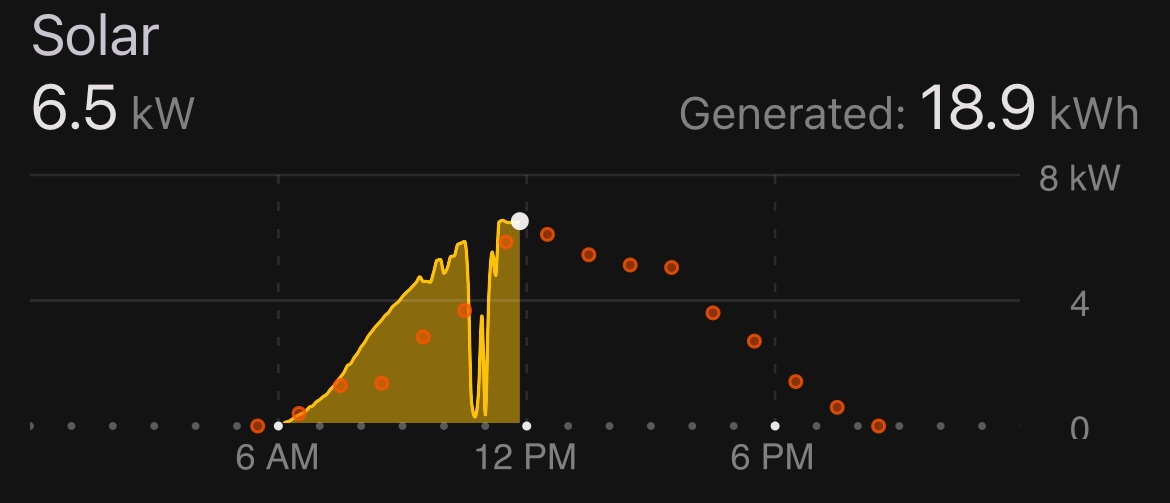
When I tested this feature on a sunny day in May with my two Powerwalls at 80% full:
- I turned on the Go Off-Grid option.
- My production immediately plummeted from 5.9 kW to 0.7 kW.
- 10 minutes later, I turned off the Go Off-Grid option, and my production quickly returned to 5.8 kW.
- Soon after, production was 6.5 kW, as shown in the following screenshot of my Netzero app which displays the Tesla app data over time.