KYC
Introduction
KYC, a standard banking practice, is crucial in preventing identity theft, money laundering, fraud, and terrorism. Your understanding and implementation of this process, which involves verifying customer identities and understanding their transaction habits, are key to ensuring compliance with legal mandates and maintaining the integrity of the financial sector.
Once your customer has provided the information necessary to complete an onboarding flow, you must start the KYC process, which involves validating your customer's identity and documents and ensuring compliance with federal regulations.
How KYC works
Using the Customer object, you can perform a host of checks and screenings to ensure compliance programmatically. The full KYC process is shown below.
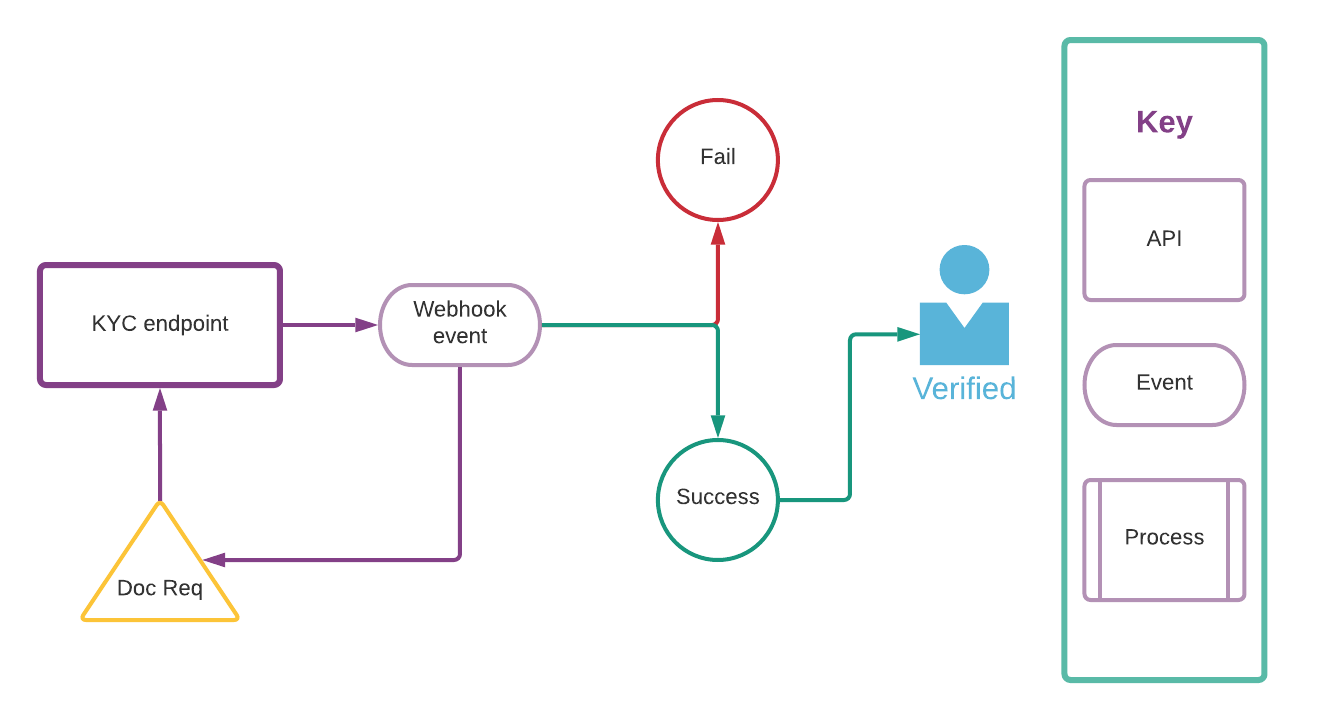
As part of the KYC check, you might receive a webhook event (kyc.verification.document_required) asking for documents to be uploaded for validation. This might happen, for example, when a customer's name does not match with the name in an SSN lookup. Refer to the Uploading KYC documents guide for details regarding how to upload documents.
Government ID information
When using Persona for KYC verification, government ID information is captured and stored with the customer record. This includes:
| Parameter | Description |
|---|---|
id_type | The type of government ID, such as dl for driver's license or passport. |
id_number | The identification number on the government ID. |
id_expiration | The expiration date of the ID in YYYY-MM-DD format. |
id_issuance | The issuance date of the ID in YYYY-MM-DD format. |
This information is automatically stored in the customer record when the KYC verification is successful. This data can be useful for regulatory compliance and future verification needs.
KYC process flow
| Step | Description |
|---|---|
1. Obtain a customer_id | Use the Customer API to retrieve an existing customer or create a new one, then obtain their customer_id. |
| 2. Start KYC process | Initiate the KYC process on a customer by calling the StartKYC endpoint. For a secured charge card program, you'll use the SubmitCreditApplication API to submit the credit application, which enables Atelio to automatically start the KYC process. |
| 3. Use Atelio's products | After a KYC is successfully initialized, it will reach Atelio's automatic evaluation process. If the customer information provided is sufficient to fulfill KYC obligations, then the customer will be eligible for Atelio's financial products. To learn more, see Atelio's evaluation process. |
Idempotency
📘 Note
The KYC endpoint is idempotent and repeated requests using the same
Idempotency-Keywithin a 24 hour period will fail.
Once a customer has successfully passed the KYC process, no further KYC attempts are allowed. Any further call for KYC authentication responds with an error and returns the timestamp of the previously successful KYC process.
Idempotency is a Web API design principle that prevents you from running the same operation multiple times. Because a certain amount of intermittent failure is to be expected, you need a way to reconcile failed requests with a server, and idempotency provides a mechanism for that. Including an idempotency key makes POST requests idempotent, which prompts the API to do the record keeping required to prevent duplicate operations. You can safely retry requests that include an idempotency key as long as the second request occurs within 24 hours from when you first receive the key (keys expire after 24 hours).
Providing the Idempotency-Key string in the header is optional and example is shown below.
JSON
{
   "Authorization": "<YOUR_AUTHORIZATION>",
   "Identity": "<YOUR_IDENTITY>",
   "Idempotency-Key": "dd6dcedd-2a11-4098-1223-876902123abc"
}
📘 Note
Most of a customer's details can't be updated after they've passed KYC as the new information needs to be verified before the update can occur. If you need to update information for a customer that has passed KYC, contact Atelio directly.
For details, see Updating a customer.
Atelio evaluation
There are multiple possible outcomes of the automatic evaluation process.
| Outcome | Explanation |
|---|---|
| Passed | The customer information provided was sufficient to fulfill KYC obligations |
| More information needed | Additional information is required to complete the KYC process |
| Review required | Atelio must review the provided information for a final decision |
| Error | An error occurred during the KYC process |
📘 KYC outcomes
More than 90% of successfully initialized KYC attempts are able to pass or reach a terminal state without additional action from users.
Passed
When a KYC is passed, the state of the KYC will become passed and a kyc.verification.success webhook will be sent to any subscribed listeners. The customer will now be eligible for the financial products on the Atelio platform associated with the program ID for which they have completed KYC.
More information needed
Sometimes a customer's information contains discrepancies or ambiguities and needs to be verified in other ways via document collection. This always results in a document_required state and an associated kyc.verification.document_required webhook being sent to any subscribed listeners. The customer has 14 days to provide the relevant information. After providing the information, the customer's KYC is returned back to Atelio's automatic evaluation process for reevaluation.
🚧 KYC timeout
If the customer does not provide the relevant information within 30 days, the customer's KYC attempt expires and a
kyc.verification.timeoutwebhook is sent to any subscribed listeners. A new KYC must be initialized for customers when this happens.
Review required
Some KYC attempts require a manual review of the provided information to ensure compliance with KYC regulations. This is communicated via an under_review state and a kyc.verification.under_review webhook being sent to any subscribed listeners. The review occurs on Atelio's side and does not need to be actioned by the customer.
A review may result in a passing judgment, which transforms the state of the KYC to passed and sends a corresponding kyc.verification.success webhook. A review may also result in a failure judgment, which transforms the state of the KYC to failed and sends a corresponding kyc.verification.failure webhook. The latter indicates that a new KYC must be started.
Error
At times, Atelio's systems may experience transient errors. This will be communicated via kyc.verification.error webhooks to any subscribed listeners. KYC attempts that experience errors should be retried. If the problem persists, escalation to Atelio support is suggested.
Error status codes
When Initializing a KYC, the expected HTTP response code is 201. However, there is the possibility of error response codes as well. The main cases are 409, 4XX excluding 409, and 5XX. The latter two can be handled in accordance with standard REST processes. The former 409 case indicates that a KYC is already initialized for the customer, and the Retrieve KYC Status endpoint should be used to check on KYC status.